Digital material culture
yuval basteker
3D PRINTING


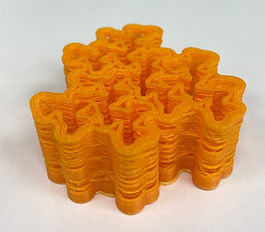

Layer height - 0.2
Infill - 10%
Aouto support


Layer height - 0.15
Infill - 10%
Aouto support


Layer height - 0.10
Infill - 50%
Aouto support
Conclusions:
The goal was to examine the effect of the definition of the infill - on the hardness of the product and after the effect of the height of each layer.
It can be seen that the smaller the height, the more "smooth" the result is and you can hardly see the layers of the material and a uniform material is created. And the higher the filling percentage, the higher the weight and the accuracy of the thickness of the lines. As you increase infill the and decrease the height of the layer, you get a better quality result.


Layer height - 0.2
Infill - 20%
Aouto support


With the help of the "covering tool" command I created a wall consisting of 3 components that change according to the position on the wall.
In order for the product to come out in an optimal way, I checked in the simulation what is the best way to create the supports. It was difficult to dismantle some of the supports because of the delicate shape.